Can you spot the difference? Your security depends on it.
Look at these two URLs:
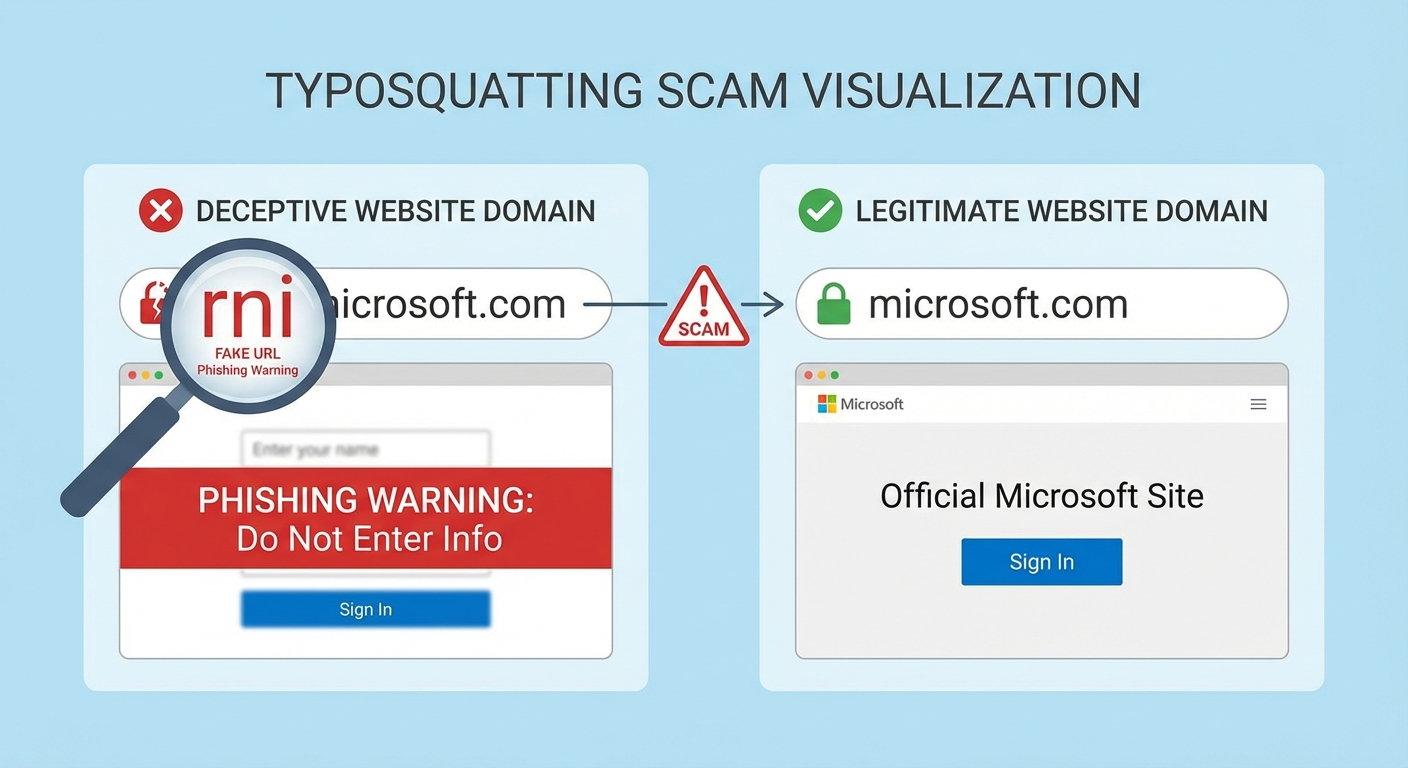
microsoft.com
rnicrosoft.com
If you’re reading this on most devices, they probably look identical. That’s exactly what scammers are counting on.
The second URL uses “rn” (the letters R and N together) instead of “m” — and in most fonts, lowercase “rn” is visually indistinguishable from “m”. This simple trick, known as typosquatting or homograph deception, has become one of the most effective phishing techniques of 2026.
EverSafe’s January 2026 Scam Watch flagged “rnicrosoft.com” as part of a massive typosquatting surge targeting tech giants. But this isn’t just about one fake Microsoft domain — it’s a window into how sophisticated scammers have become at exploiting the gap between what we see and what’s actually there.
The Anatomy of the “rn” Trick
Why It Works
Open any email client, browser, or messaging app. Type “microsoft” and then type “rnicrosoft” right below it. Unless you’re using a monospace font (where each character has equal width), the difference is nearly impossible to detect.
Visual Comparison:
What You See What It Actually Says
microsoft.com microsoft.com ✅
rnicrosoft.com r + n + icrosoft.com ❌
The trick exploits a fundamental flaw in how we read: our brains don’t process every letter individually. We see word shapes. When “rn” creates the same visual shape as “m,” our brains autocomplete to the familiar word.
This is called orthographic processing — and scammers have turned it into a weapon.
Where You’ll Encounter It
The fake “rnicrosoft” domains appear in:
- Phishing emails claiming your Microsoft 365 account needs verification- Fake Microsoft support calls where scammers direct you to “rnicrosoft.com/support”- Malware download pages disguised as Windows Update or Office installer sites- Tech support pop-ups warning of “detected viruses” with a link to “Microsoft support”- LinkedIn and social media messages with job offers from “Microsoft recruiters”
The attacks are sophisticated. Many include Microsoft’s actual logos, color schemes, and formatting — scraped directly from legitimate Microsoft pages. The only tell is that tiny URL.
The 2026 Typosquatting Surge
The “rnicrosoft” scam isn’t isolated. It’s part of a documented explosion in typosquatting attacks throughout 2025 and into 2026.
By the Numbers
- Typosquatting domain registrations increased 47% from 2024 to 2025- Microsoft impersonation remains the #1 target (22% of all brand spoofing)- Financial losses from typosquatting exceeded $1.2 billion globally in 2025- Average victim loses $4,200 before realizing they’ve been scammed
Why the Surge?
Several factors have converged:
- Cheap domain registration: Bulk discount registrars allow scammers to register hundreds of variations for pennies each2. Free SSL certificates: Let’s Encrypt makes fake sites show the “secure” padlock3. AI-generated content: Scammers use LLMs to write convincing phishing emails at scale4. Mobile browsing: Smaller screens make URL inspection harder5. QR code adoption: QR codes hide URLs entirely until it’s too late
The Typosquatter’s Playbook: Common Tricks
The “rn = m” trick is just one technique. Here’s the full arsenal:
1. Character Substitution (Visual Lookalikes)
Trick Example What It Mimics
rn → m rnicrosoft.com microsoft.com
vv → w vvellsfargo.com wellsfargo.com
l → 1 (one) paypa1.com paypal.com
O → 0 (zero) g00gle.com google.com
I → l (lowercase L) appIe.com apple.com
cl → d arnazon.com amazon.com
2. Adjacent Key Typos
Exploiting common keyboard mistakes:
- goole.com (missing “g”)- amzon.com (missing “a”)- facebok.com (missing “o”)- twtter.com (missing “i”)
3. Domain Extension Swaps
- amazon.co (instead of .com)- google.org (instead of .com)- microsoft.net (instead of .com)- apple.co.uk (for US victims)
4. Subdomain Abuse
- microsoft.com.verify-account.com (real site is verify-account.com)- login.paypal.secure-verify.net (real site is secure-verify.net)- amazon-delivery.tracking.scammer.com (real site is scammer.com)
5. Internationalized Domain Names (IDN Homographs)
Using Cyrillic or Greek characters that look identical to Latin letters:
- аpple.com (Cyrillic “а” instead of Latin “a”)- gооgle.com (Cyrillic “о” instead of Latin “o”)
These are particularly dangerous because they’re visually perfect — even in monospace fonts.
Real-World Attack Scenarios
Scenario 1: The “Password Reset” Email
From: security@rnicrosoft.com Subject: Unusual sign-in activity on your account
We detected a sign-in attempt from an unrecognized device. If this wasn’t you, please verify your identity immediately.
[Verify Your Account]
The link goes to a pixel-perfect replica of the Microsoft login page. You enter your credentials. They go straight to the attacker.
Scenario 2: The Tech Support Pop-up
You’re browsing when a full-screen warning appears:
⚠️ VIRUS DETECTED Your Windows computer is infected! Call Microsoft Support immediately: 1-888-XXX-XXXX Or visit rnicrosoft.com/security-center
You call. A friendly “Microsoft technician” asks for remote access to “fix the problem.” They install actual malware, then charge you $299 for the “service.”
Scenario 3: The LinkedIn Job Offer
Hi [Name],
I’m a recruiter at Microsoft and I was impressed by your profile. We have an exciting Senior Developer role that matches your experience.
Please review the position details at rnicrosoft.com/careers/apply and submit your application with your resume and references.
The fake application page collects your full name, address, work history, references, and Social Security Number for “background check purposes.”
How to Protect Yourself
Before You Click: The 3-Second URL Check
STOP before clicking any link and do this:
- Hover over the link (on desktop) to reveal the actual URL2. Read the domain backwards — start from the slash and go left to the dot3. Check for suspicious characters — anything that looks “off”
The Backwards Test:
In https://login.rnicrosoft.com/oauth, work backwards from the first /:
- The domain is everything between
://and the first/-login.rnicrosoft.com→ the actual site isrnicrosoft.com- Caught!
On Mobile: Extra Caution Required
Mobile browsers show less of the URL. Best practices:
- Long-press links to preview the URL before opening- Never enter credentials on sites you reached via link — manually navigate instead- Be especially skeptical of QR codes (they completely hide the destination)
Use a Password Manager
Password managers only auto-fill on the exact domain you saved. If you’re on rnicrosoft.com but your login was saved for microsoft.com, it won’t fill. This mismatch is a built-in typosquatting alarm.
Recommended password managers:
- 1Password- Bitwarden- Dashlane- KeePassXC (free, open-source)
Browser Extensions That Detect Typosquatting
Several browser extensions actively protect against typosquatting:
Extension Browser What It Does
Netcraft Anti-Phishing Chrome, Firefox, Edge Real-time phishing site blocking
Typosquatting Detector Chrome Warns when URL resembles known brands
Malwarebytes Browser Guard Chrome, Firefox, Edge Blocks malicious sites, typosquatters
uBlock Origin All major browsers Community-maintained block lists
Microsoft Defender Browser Protection Chrome, Edge SmartScreen integration
Pro tip: Layer multiple extensions. No single tool catches everything.
Enable DNS-Level Protection
Block known malicious domains before they load:
- Cloudflare 1.1.1.1 for Families: Free DNS that blocks malware domains- Quad9 (9.9.9.9): Non-profit DNS with threat intelligence- NextDNS: Customizable with logging and analytics
When in Doubt: Navigate Manually
The safest approach: never click links for important sites.
Instead:
- Open a new browser tab2. Type the site address yourself (or use a bookmark)3. Navigate to whatever page you need
This adds 10 seconds but eliminates typosquatting risk entirely.
What to Do If You’ve Been Caught
If you entered credentials on a typosquatting site:
Immediate Actions (Do These NOW)
- Change the password on the real site immediately2. Enable MFA if you haven’t (authenticator app, not SMS)3. Check for unauthorized access — recent logins, sent emails, purchases4. Revoke active sessions on the real account (“sign out everywhere”)5. Scan for malware if you downloaded anything
If Financial Information Was Exposed
- Contact your bank and report the incident2. Freeze your credit at all three bureaus (Equifax, Experian, TransUnion)3. Set up fraud alerts with your financial institutions4. Monitor statements for 90 days minimum
Report the Scam
- FTC: reportfraud.ftc.gov- FBI IC3: ic3.gov (for significant losses)- Microsoft: microsoft.com/reportaphishingsite- Google Safe Browsing: safebrowsing.google.com/safebrowsing/report_phish/
Your report helps get malicious domains taken down faster.
The Bigger Picture: Why This Matters
Typosquatting exploits something fundamental about human cognition: we trust our eyes. We’ve been reading for years, maybe decades. Our brains are optimized for speed, not security.
Scammers understand this. They’ve weaponized typography itself.
The defense isn’t superhuman vigilance — it’s systems. Password managers that check domains. Browser extensions that flag lookalikes. DNS services that block known threats. Habits that route around the problem entirely.
No single defense is perfect. But layered together, they create enough friction that scammers move on to easier targets.
Quick Reference: The Typosquatting Survival Card
Print this. Share it. Put it next to Grandma’s computer.
🚫 RED FLAGS
- Email asking you to “verify” or “confirm” account- Pop-ups claiming virus detection- Urgent deadlines (“act in 24 hours or lose access”)- Links in messages you didn’t expect- URLs that look slightly wrong
✅ SAFE HABITS
- Type important URLs manually (bookmark them)- Use a password manager — it checks domains for you- Hover before clicking (desktop) or long-press (mobile)- When in doubt, go directly to the company’s website- Enable MFA on every account that offers it
🔧 TOOLS
- Password manager: Bitwarden, 1Password- Browser extension: Netcraft, Malwarebytes Browser Guard- DNS protection: Cloudflare 1.1.1.3, Quad9
🆘 GOT SCAMMED?
- Change password immediately on real site2. Enable MFA3. Check for unauthorized activity4. Report: reportfraud.ftc.gov
Share This With Someone Who Needs It
You probably know someone who clicks first and thinks second. Maybe it’s a parent, a grandparent, or a coworker who’s always forwarding chain emails.
Send them this article.
The “rnicrosoft” trick catches smart people every day. It’s not about intelligence — it’s about knowing the trick exists. Now you do.
And now they can too.
Stay vigilant. Trust systems over eyes. And when something feels wrong, it probably is.